
A fake app impersonating Google Chrome reportedly attracted more than 100,000 downloads on the Google Play Store before it was removed from the platform. The incident has raised fresh concerns about app verification, misleading listings and the effectiveness of Google’s security checks.
The suspicious application allegedly appeared near the top of Play Store search results when users searched for “Chrome”. A screenshot shared by a Reddit user showed the app listing under the developer name Hizbartech, with its name and icon designed to resemble Google’s popular web browser.
Fake Chrome App Reportedly Started as a Game
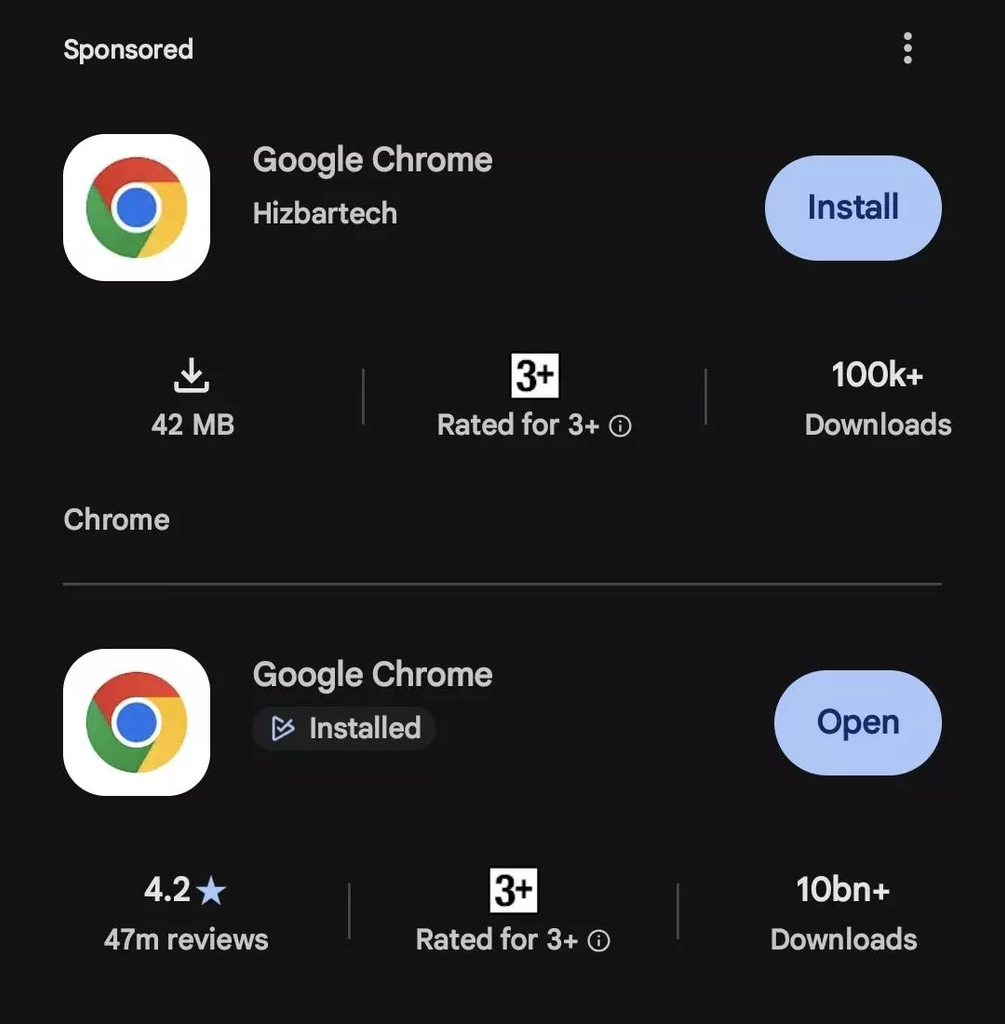
According to a report by Android Authority, the application was initially published on the Play Store as a game called Ball Bounce. Its name and icon were reportedly changed later to make it look like Google Chrome.
This change could have misled users searching for the official Chrome browser, particularly those who rely on search results instead of checking the developer’s identity before installing an application.
The incident highlights how an existing app listing can potentially be repurposed to imitate a well-known brand, creating confusion among unsuspecting users.
Reddit Users Question the App’s Functionality
The suspicious app also attracted attention on Reddit, where users discussed what it actually did after installation.
One commenter claimed that the application behaved like a chat app that generated random responses rather than functioning as a browser. Another comment suggested that it featured AI-generated avatars and unusual contact-related functionality.
These descriptions were shared by Reddit users and have not been independently verified. There is also no confirmed evidence in the available report that the app contained spyware, an information stealer or other specific malware.
Fake Application Reportedly Removed From Play Store
Reddit users subsequently reported that the fake Chrome application had been removed from the Google Play Store. However, the available information does not establish the exact time of removal or whether Google issued a public statement explaining its action.
The reported removal came after the app had allegedly accumulated more than 100,000 downloads, raising questions about how long the misleading listing remained available and how many users may have installed it.
Questions Raised Over Google’s App Review Process
The incident has renewed concerns about the safeguards used to identify applications that impersonate popular services.
Google Play uses app review procedures and security protections to help identify harmful or deceptive applications. However, incidents involving misleading names, icons or developer information demonstrate that these measures may not prevent every suspicious listing from reaching users.
The reported case also drew attention to the possibility that paid advertising helped the application gain visibility in search results. If confirmed, this would raise additional questions about how promoted app listings are reviewed when they resemble established brands.
The available information does not establish how the app passed Google’s checks or whether advertising directly contributed to its reported download count.
How Android Users Can Avoid Fake Chrome Apps
Users can take several precautions before installing applications from the Play Store:
- Check the developer: Verify that the application comes from the official publisher, Google LLC in Chrome’s case.
- Review the listing: Look carefully at the app description, permissions, reviews and download information.
- Use official sources: Access Chrome through Google’s official website or its verified Play Store listing.
- Avoid suspicious permissions: Be cautious if an application requests access unrelated to its advertised purpose.
- Uninstall unfamiliar apps: Remove suspicious applications and review their permissions if they are already installed.
If users suspect an app is malicious, they can also run Google Play Protect and report the listing through the Play Store.
Conclusion
The reported fake Google Chrome listing serves as a reminder that even well-known app stores can contain misleading applications. With the suspicious app reportedly surpassing 100,000 downloads before its removal, the incident underscores the importance of checking app publishers and verifying listings before installation.
Further clarification from Google would help explain how the application remained available and whether any additional safeguards will be introduced to prevent similar incidents.